


Your gas station POS system rings every sale, so it is easy to assume it is doing its job. But a system can keep working and still cost you real money every single month.
The obvious costs show up on invoices. The bigger ones hide in outage hours, slow training, daily workarounds, and features you never get to use.
The risks around EMV, PCI DSS, and fraud liability get most of the attention. This guide looks at the everyday operating costs instead, and gives you a simple way to put a number on them for your own sites.
What Makes a Gas Station POS System Outdated

Age alone does not make a system outdated. What matters is what it can no longer do for you, and how much effort your team spends covering the gap.
Canadian Fuels Association data shows 11,611 retail gasoline stations in Canada, and 78% are price-controlled by individual proprietors or companies outside refining. That means most technology decisions come straight out of your own margin.
Let’s break it down. Here is how an outdated gas station POS system compares with a current one.
|
Area |
Outdated gas station POS system |
Current gas station POS system |
|
Outage recovery |
Slow restarts and long waits for a technician |
Built so one fault does not stop every lane |
|
Price changes |
Entered separately at the POS, dispensers, and signs |
Managed from one place across the forecourt |
|
Reporting |
End-of-day exports rebuilt by hand |
Consolidated reports without manual rework |
|
Training |
Long, with unwritten workarounds |
Short, with consistent screens |
|
Support |
Parts and expertise are getting harder to find |
Supported hardware and active development |
|
New features |
Custom work or simply not possible |
Added through integrations |
If three or more rows on the left sound familiar, the rest of this guide will put a price on each one.
What Other Fuel Retailers Say About Their Aging Systems

You might be wondering whether this is just your site. It is not.
NACS Magazine reports that replacing a POS system is expensive, so most retailers invest in one only once or twice a decade. That is how a system ends up stretched far past its best years.
The same article describes Tennessee chain Weigel’s dealing with unreliable hardware, slow loyalty transactions, and trouble adding new technology before its upgrade.
Huck’s Market, which has 135 Midwest locations, said its old system felt out of step with its modern stores. Different chains, same symptoms.
Downtime Is the Cost You Never Budgeted For
A frozen register on a Friday afternoon does not just delay one customer. It stops fuel, coffee, and snack sales all at once.
A 2021 Censuswide survey for Zynstra, an NCR company, found that c-store retailers lose up to $855 per hour when a store system fails.
Relaunching a failed system took up to 5.43 hours, or about $4,643 in lost revenue per day. Almost every respondent was affected, with 98% reporting a store system failure.
The sample was 100 US managers at larger chains, so your own hourly sales are the number that counts. Still, the pattern holds at any size. A short outage is not short when it lands on your busiest hour.
Why an Older Gas Station POS System Recovers Slower
Outages are not random, and older systems tend to fail in ways that take longer to fix.
Single points of failure
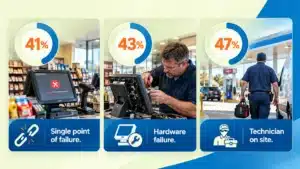
The same survey found that 41% of respondents had at least one component acting as a single point of failure. When one controller or terminal sits between your counter and your dispensers, one fault stops everything.
Hardware that is hard to fix
43% of respondents named hardware failure as a cause, and 47% said a technician had to visit the store at least half the time. With discontinued terminals, every hour of waiting is an hour of lost sales.
A connection you do not control
Systems that rely on the internet to route or authorize sales stop when your connection does. A hybrid POS architecture keeps your counter, dispensers, price signs, and car wash running locally, with the cloud handling reporting.
Training and Turnover Quietly Tax Your Labor Budget

Every new hire learns your POS from scratch, and the more quirks it has, the longer that takes.
NACS reports that store employee turnover typically exceeds 100%. Time to full productivity is just under 40 days for a part-time hourly employee and 112 days for a store manager.
You cannot fix turnover with software. But you can decide how much of that ramp-up time goes to learning quirks and unwritten fixes instead of serving customers.
Picture the sticky note on the register that explains how to run a pump prepay. Every note like that is a training cost you pay again with each new hire.
The Workarounds Nobody Writes Down
A lot of the cost sits in small daily tasks that nobody counts.
- Price changes entered more than once at the POS, the dispensers, and the price signs.
- Fuel and store sales reconciled by hand in a spreadsheet at close
- Reports were rebuilt manually because the POS exports do not match your accounting layout
- Stock is counted by hand because the inventory does not update with every sale
- Calls to a technician for faults your team has learned to live with
Individually, each of these takes minutes. Together they add up to hours every week, and each manual step is another chance for a typo. That is how manual reporting errors start to creep into your numbers.
Ask your closing shift how long the daily routine really takes. The answer is often longer than you expect.
The Maintenance Trap You Probably Never Measure
There is a research-backed way to check whether you are paying to keep an old system alive instead of improving your business.
What a Government Audit of Aging Systems Found
The US Government Accountability Office (GAO) reviewed how federal agencies spend their technology money. It found that about 75% of the IT budget for fiscal year 2015 went to operations and maintenance, which simply means keeping existing systems running.
Maintenance spending rose over seven fiscal years, while money for development and modernization fell by $7.3 billion between fiscal years 2010 and 2017. Of roughly 7,000 investments, 5,233 spent every dollar on maintenance and nothing on improvement.
A federal budget is not a gas station, but the pattern is familiar. Maintenance quietly crowds out improvement until keeping the old system alive is all you can afford.
GAO also recommended that agencies run required reviews of systems in their maintenance phase to confirm that those systems still meet their needs. That habit is easy to copy on your own sites.
The Keep-the-Lights-On Test for Your Site
You can borrow that lens for an afternoon. Work through these four steps for each site.
- Add up 12 months of support fees, repairs, parts, and technician visits for your POS.
- Add the staff hours spent on workarounds, priced at your average wage.
- Add what you spent on anything that improved the business, such as new integrations or better reporting.
- Divide the combined total of steps 1 and 2 by the total of steps 1, 2, and 3.
No records yet? Start a simple log of outages, support calls, and workaround hours, and run the test again in 90 days.
There is no official benchmark for gas stations, so treat the result as a trend rather than a grade. If the share climbs year after year, you are in the same trap GAO described.
The Sales You Never Get to Make

Some costs never show up on an invoice. An old system cannot sell what it cannot support.
In the CSP C-Store Technology Outlook, more than 26% of retailers said their current systems lack needed functionality. Only 17% were very satisfied with their technology stack.
Commercial drivers expect fleet fueling accounts to come with card controls and clean reporting. Customers expect loyalty offers and modern payment options at the pump and the counter.
Foodservice adds menu items, modifiers, and prep tracking that older terminals were never built to handle.
Each missing capability is a customer who buys somewhere else, and you never see the sale you lost. That makes this the cost that is easiest to underestimate.
Try a quick exercise. Ask your front-line team which requests they turn down each week. That list is the start of your lost-sales estimate.
Adding It Up for One Site
Let’s put numbers on it. The table below is an illustration, not a benchmark, so swap in your own figures.
|
Cost line |
Example assumption |
Annual cost per site |
|
Unplanned downtime |
4 outages × 3 hours × $855 per hour |
$10,260 |
|
Extra training time |
6 hires × 4 extra hours × 2 people × $20 per hour |
$960 |
|
Daily workarounds |
45 minutes a day × 365 days × $20 per hour |
$5,475 |
|
Technician visits and repairs |
8 visits × $250 |
$2,000 |
|
Total per site |
$18,695 |
Across 10 sites, that example comes to about $186,950 a year, before you count lost sales or compliance exposure.
The $855 hourly figure comes from larger chains, and the $20 wage is a placeholder. Replace both with your own numbers.
When Waiting Costs More Than Replacing
The math tips sooner than most people expect, because these costs repeat every year.
Look for these signs.
- Outages are getting more frequent or taking longer to fix
- Your vendor or technician warns that parts or support are ending
- Price changes still need to be entered in more than one place
- Reports need rebuilding by hand before you trust them
- New hires keep asking the same workaround questions
- Customers or fleet accounts ask for features you cannot add
If two or three apply, plan a switch rather than waiting for a failure to force one. A step-by-step migration plan with a parallel run and proper staff training keeps cutover risk low.
How C-Store Commander and Fuel Commander Change the Math

Infonet has spent 25+ years building software for fuel and convenience retail, and has optimized 1,000+ sites.
C-Store Commander runs your POS and back office locally, so dispenser, fuel price sign, and car wash connections do not depend on your internet connection. The cloud handles reporting and data capture only.
Fuel Commander covers unattended fueling sites. Because POS, back office, and fuel management are integrated, your team works from one system instead of reconciling several.
Run the numbers from the sections above first. Then compare them with what a system built around your forecourt would take off your plate.
Key Takeaways
An outdated gas station POS system costs you in outage hours, training time, daily workarounds, maintenance spend, and sales you never see. Most of it sits outside the invoice, which is why it goes unmeasured for years.
Run the keep-the-lights-on test, build your own version of the cost table, and decide with real numbers. If you want a second pair of eyes on the results, talk it through with the Infonet team.
Frequently Asked Questions
How much does an outdated gas station POS system cost per year?
It depends on your outages, staffing, and workarounds. In the illustrative model above, one site loses about $18,695 a year to downtime, training, workarounds, and repairs. Swap in your own figures for a realistic number.
How do I know if my gas station POS system is outdated?
Look for frequent outages, price changes entered in several places, manual reconciliation, and warnings that parts or support are ending. If your team relies on sticky notes and spreadsheets to make the system work, it has already fallen behind.
Can a gas station POS system keep selling when the internet goes down?
Yes, when the POS and back office run locally. That keeps the counter and forecourt selling without relying on the internet. C-Store Commander works this way, with the cloud handling reporting and data capture only. Ask any vendor to demo offline selling.
What should a modern gas station POS system integrate with?
At minimum, your fuel dispensers, price signs, payment terminals, car wash controllers, and back office. Strong integrations remove double entry and keep fuel and store sales in one set of reports.
Is it cheaper to keep repairing an old POS system?
Not once do repairs and workarounds take up most of what you spend on technology. Run the keep-the-lights-on test. If maintenance costs keep rising while nothing improves, replacing the system often costs less than another year of patching.